

Marketing performance reporting is a decision-grade summary that ties channel metrics to business outcomes and a single next action. Its job isn't to document activity. It's to answer three questions fast: are we winning, where are we losing, and what changes next. A report that doesn't produce a decision within minutes of opening it has failed, regardless of how many charts it contains.
TL;DR:
- Reports should focus on decision-making speed, with dashboards for real-time monitoring and slides for storytelling, depending on the audience's needs and cadence.
- A concise monthly CEO one-slider must include 3 to 5 key KPIs, a channel health grid, the top win, and a specific recommended action, all prioritized by company goals.
- Limiting KPIs to 15 to 20 and focusing on decision-relevant metrics prevents analysis paralysis and keeps reporting actionable.
- Use incrementality testing and measurement validation to ensure that channel performance reflects true causal impact, not just correlation from attribution models.
- Reports must clearly connect metrics to specific decisions, with structured observations, drivers, impacts, and next steps, to drive effective budget and strategy adjustments.
Table of Contents
- What Should a Marketing Performance Report Include?
- How Do You Build a CMO One-Slider That Gets Read?
- Which KPIs Actually Belong in a Marketing Performance Dashboard?
- What Metrics Matter for Each Marketing Channel?
- How Do You Build a Full-Funnel Conversion Analysis?
- How Do You Report Budget vs. Actual Spend and ROAS?
- What's the Right Template for a Monthly Marketing Report?
- How Do You Build a Reporting Workflow Without Data Silos?
- How Do You Turn Reports Into Decisions?
- Why Measurement Validation Changes What Your Reports Can Prove
- Decision-First Reporting: What the Research Actually Supports
- How Cassandra Turns Reporting Into Validated Decisions
- Sources
- FAQ
What Should a Marketing Performance Report Include?
The format depends entirely on who reads it and how often they need to act. A dashboard and a slide deck solve different problems, and confusing the two is one of the most common reasons reports get ignored.
Dashboards are built for real-time monitoring. A channel manager checking daily spend pacing, a paid social lead watching CPA drift midweek, or an SEO analyst tracking keyword rank movement all need live access, not a static file. Domo's reporting guide frames this correctly: dashboards give access, decks give narrative. Slide-based reports, by contrast, exist to tell a story with a point of view. They compress a month of noisy data into a handful of conclusions a CMO or budget owner can act on without digging through raw numbers themselves.
Cadence follows the same logic. Match the reporting rhythm to how fast the underlying program actually moves:
- Daily: Reserved for active, high-spend campaigns (a holiday launch, a major paid push) where pacing errors compound quickly if left unchecked.
- Weekly: The right cadence for channel leads managing live campaigns, tracking CPA, CTR, and spend pacing against a monthly target.
- Monthly: The default for multi-channel programs and executive audiences. This is where most CMO one-slider decks belong.
- Quarterly: Best for strategic reviews, budget planning cycles, and board-level updates where trend matters more than any single week's fluctuation.
Here's the tradeoff that gets underestimated: more frequent reporting costs real analyst time, and it can actively work against good decisions. Mailchimp's guidance on reporting cadence makes a point worth internalizing. Reviewing a stable, lower-budget program weekly often just adds noise. Random week-to-week variance gets mistaken for a signal, and teams end up reacting to statistical noise instead of a real trend. Quarterly reviews suit those programs better. Reserve weekly and daily cadences for campaigns with enough spend and volatility that faster feedback actually changes what you'd do.
The practical rule: if a report's insight doesn't change with more frequent checking, you're paying for reporting overhead without buying better decisions.
How Do You Build a CMO One-Slider That Gets Read?
Most executives don't read marketing reports the way analysts write them. A Demand Gen Report survey found many CMOs spend fewer than 10 minutes reviewing monthly channel reports.(https://scalegrowth.digital/resources/analytics/marketing-report-template/). That number should reshape how you structure the opening page of every report you build. If leadership gives you ten minutes, the first slide has to work in under sixty seconds.
The CMO one-slider format solves this by compressing an entire month into four elements:
- 3 to 5 KPI cards. Each card shows one metric, its trend arrow (up, down, flat), its target, and a traffic-light status (green, yellow, red). No raw tables. No secondary metrics competing for attention.
- A channel health grid. A compact matrix, one row per channel, columns for spend, primary outcome (leads, revenue, orders), and status color. This lets a reader scan every channel's health in one glance without reading channel-by-channel prose.
- This month's top win. One line, framed as a business outcome, not a vanity metric. "Paid search delivered 22% more qualified leads at flat spend" beats "impressions grew."
- One recommended action. A single, specific next step, not a list of options. "Reallocate $15K from Display to Search next month" is decision-ready. "Consider optimizing Display" is not.
Choosing which 3 to 5 KPIs earn a spot on this slide is the hardest part of the exercise, and it should be harder than picking the metrics you'd put in a full appendix. Start from the company's current growth goal, not from what's easiest to pull. If the priority is pipeline growth, marketing-sourced pipeline and CAC belong on the slide even if channel-level CTR is more flattering. If the goal is retention, churn-adjusted LTV matters more than top-of-funnel volume.
Pro Tip: Build the one-slider last, not first. Draft your full channel sections and funnel snapshot, then ask which single win and which single ask would matter most to someone who read nothing else. That's your slide.
Formatting conventions matter more than they seem to. Consistent trend arrows, a fixed traffic-light threshold (define what counts as red before the month starts, not after), and one action per slide, never three, keep the format from degrading into a mini-dashboard of its own.
Which KPIs Actually Belong in a Marketing Performance Dashboard?
Metric overload is the single fastest way to kill a report's usefulness. Every additional KPI added "just in case" dilutes attention from the ones that actually drive a decision. ScaleGrowth's guidance on report structure is blunt about this: pick metrics tied to decisions, not metrics that are simply available.
Cap your full report at 15 to 20 KPIs total, across all sections combined. That ceiling forces prioritization. If you're above 20, you're likely tracking metrics that inform no specific action, and they should move to an appendix or get cut outright.
Start at the business-outcome layer, since these are the numbers a CFO or CEO will ask about regardless of channel mix:
- Revenue attributed to marketing (by channel and blended)
- Marketing-sourced pipeline for B2B and longer-cycle sales models
- Customer acquisition cost (CAC), ideally blended and by primary channel
- Customer lifetime value (LTV), where the business model and data maturity support it
- Marketing-influenced revenue as a secondary lens when last-touch attribution understates upper-funnel channels
Below that sits the channel layer, and the right KPI depends on what each channel is actually supposed to accomplish. A channel optimized for awareness shouldn't be judged by the same yardstick as one optimized for conversion:
- Awareness objective: impressions, reach, share of voice, branded search volume
- Acquisition objective: cost per lead, click-through rate, cost per click, new session volume
- Conversion objective: conversion rate, cost per acquisition, average order value
- Retention objective: repeat purchase rate, churn rate, email engagement rate, customer lifetime value trend
Statistic to know: the discipline of limiting scope isn't just a formatting preference. When teams cap KPIs to a decision-relevant shortlist, ScaleGrowth's analysis notes it directly counters the analysis paralysis that comes from tracking everything a platform happens to expose by default.
What Metrics Matter for Each Marketing Channel?
Channel sections fail when they mirror the platform's native dashboard instead of answering a comparable question across channels. HubSpot's analytics documentation treats channel performance, attribution, and engagement insight as the backbone of standard reporting, and each channel needs its own short, consistent metric set rather than a dump of everything the platform tracks.
SEO: Organic sessions, keyword ranking movement (top 3, top 10 counts), organic conversion rate, and share of branded versus non-branded traffic. A trend line over 12 months matters more than any single month's snapshot, since organic performance tracking tends to lag algorithm and content changes by weeks.
Paid search and paid social: CPA, ROAS, CTR, and spend pacing against budget. A share-of-spend chart across campaigns clarifies where budget concentration actually sits, which a flat spend table doesn't show at a glance.
Email: Open rate, click rate, conversion rate, and list growth or churn. Mailchimp's own reporting framework treats deliverability and list health as leading indicators worth flagging before engagement metrics start slipping.
Social (organic): Engagement rate, follower growth, share of voice, and top-performing content type. Absolute follower counts matter far less than engagement rate trend, which reflects actual content resonance.
Content marketing: Organic sessions to content, average time on page, content-assisted conversions, and top-performing assets by conversion, not by traffic alone.
E-commerce: Revenue by channel, average order value, cart abandonment rate, and return on ad spend by product category.
For every channel, show month-over-month and year-over-year comparisons side by side. A single month's number without context invites misreading. And attach the attribution caveat plainly: last-touch models systematically understate upper-funnel channels like display and organic social, so a channel's raw conversion count often understates its real contribution to the funnel.
How Do You Build a Full-Funnel Conversion Analysis?
Full-funnel measurement connects the dots that channel reports leave separate: how a session eventually becomes revenue. Without this view, a channel can look strong on cost-per-click and still be quietly failing to produce pipeline.
Building the snapshot follows a consistent sequence:
- Start with sessions or traffic by channel, as the top of the funnel.
- Track leads generated (form fills, sign-ups, demo requests) and the session-to-lead conversion rate.
- Mark marketing-qualified leads (MQLs) using a consistent scoring or criteria definition applied the same way every month.
- Track sales-qualified leads (SQLs), the point where sales accepts a lead as viable.
- Close the loop at closed-won revenue, calculating the SQL-to-close rate and total funnel conversion rate from session to customer.
Report the conversion rate between every single stage, not just the overall funnel rate. A healthy overall conversion rate can hide a badly leaking middle stage. If MQL-to-SQL conversion drops more than 20% month over month, that's the threshold worth flagging for a sales and marketing alignment review, not a footnote buried in an appendix.
Pro Tip: When a funnel stage underperforms two months running, don't just note it. Pair it with a specific test recommendation. Structured experiment design gives you a framework for turning a funnel leak into a testable hypothesis rather than a vague "we'll monitor this" line that never gets resolved.
Funnel analysis on its own tells you where the drop-off happened. It doesn't tell you why, or whether a channel actually caused the movement you're seeing. That's the gap incrementality testing and conversion lift analysis exist to close, and it's worth building that connection into your reporting cadence rather than treating funnel and testing as separate workstreams.
How Do You Report Budget vs. Actual Spend and ROAS?
Financial credibility is often what determines whether a report earns a bigger budget or gets questioned line by line. Present planned versus actual spend side by side, by channel, with a variance percentage calculated as (actual minus planned) divided by planned.
ROAS and CPA aren't interchangeable, and using the wrong one muddies the read. ROAS (revenue divided by ad spend) fits e-commerce and any model where a single purchase has a clear, immediate dollar value. CPA (spend divided by acquisitions) fits lead-generation and B2B models where the "acquisition" is a lead or trial, not a completed sale, and revenue realizes months later.
- Report ROAS by channel and blended, alongside the target ROAS for that channel.
- Report CPA by channel, segmented by lead quality tier where the data supports it, since a cheap low-quality lead skews the number favorably while hurting pipeline downstream.
- Flag any channel where CPA has risen or ROAS has fallen more than 15% for two consecutive periods; that's the threshold for escalation, not a single bad week.
Consistency here is what keeps stakeholders from arguing about whether a number is "actually bad" every single month.
When a channel's ROAS moves sharply and the cause isn't obvious from spend or targeting changes, that's the signal to run an incrementality test before reallocating a meaningful chunk of budget. Attribution and last-touch ROAS can both mislead on their own; a real budget reallocation decision deserves incrementality validation before dollars move.
What's the Right Template for a Monthly Marketing Report?
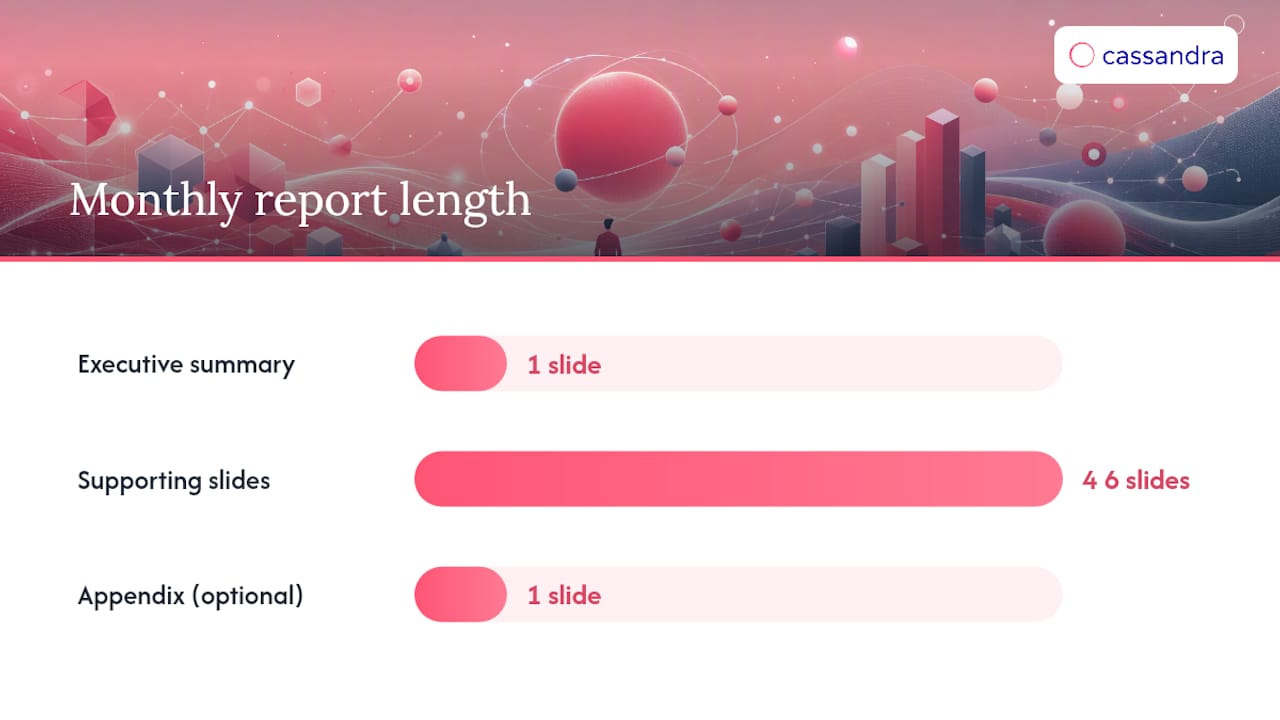
A monthly report works best as one executive summary page followed by four to ten supporting slides or dashboard pages, depending on how many channels you're running and how much testing happened that month. Anything longer than ten supporting pages usually means channel sections need consolidating, not expanding.
A typical slide-by-slide outline for a monthly report looks like this:
- Slide 1: CMO one-slider (KPI cards, channel health grid, top win, next action)
- Slide 2: Funnel snapshot, sessions through closed revenue, with conversion rates by stage
- Slides 3 to 6: One slide per major channel (paid, organic, email, social), each with its own KPI set and MoM/YoY trend
- Slide 7: Budget vs. actual spend and ROAS/CPA summary
- Slide 8: Test learnings and incrementality findings from the month
- Slide 9: Priorities and recommended actions for next period
- Slide 10 (optional): Appendix with raw data for anyone who wants to dig deeper
Whether each section becomes an automated dashboard tile or a written narrative slide depends on volatility and audience. DashThis's guidance on report structure recommends grouping related metrics visually and adjusting the format to the audience, an internal channel manager wants to live dashboard access, while a board member wants three narrative sentences and a chart, not a live feed they'll never open.
| Report Element | Best Format | Typical Audience |
|---|---|---|
| Executive summary | Slide (static) | CMO, leadership |
| Channel health grid | Slide or dashboard tile | Marketing team, leadership |
| Funnel snapshot | Slide (static) | Cross-functional, sales alignment |
| Daily pacing metrics | Live dashboard | Channel managers |
| Budget vs. actual | Slide (static) | Finance, leadership |
| Test learnings | Slide (narrative) | Marketing team, leadership |
Automate anything that needs frequent checking with no interpretation required, like pacing metrics. Reserve narrative slides for anything that needs a human explaining what the number means and what to do about it.
How Do You Build a Reporting Workflow Without Data Silos?
The mechanics of assembling a report matter as much as its structure. A well-designed template built on inconsistent or duplicated data still produces a misleading report.
Start with a clear inventory of data sources: ad platform APIs (Google Ads, Meta, LinkedIn), your CRM, email platform, web analytics, and e-commerce backend if applicable. Connector tools that pull these into a shared warehouse or unified dashboard cut down the manual export work that eats an analyst's first week of every month. Domo's guidance on data integration treats centralizing data sources as the standard fix for the fragmentation that causes most cross-platform reporting errors.
A reliable month-end workflow follows a consistent sequence:
- Set fixed export timelines. Pull all platform data on the same day each month, ideally after platforms finish attribution processing (many finalize conversion data 24 to 72 hours after month-end).
- Reconcile before reporting. Cross-check CRM-reported revenue against finance's actual booked revenue before the numbers go into any deck.
- Refresh dashboards on a fixed cadence, not ad hoc, so channel leads always know when the data they're viewing was last updated.
- Lock metric definitions in writing. "Conversion" needs one definition applied everywhere, not a different meaning in the paid team's spreadsheet versus the email platform's default report.
Three pitfalls cause most of the credibility damage in cross-platform reporting. Metric drift happens when a platform quietly changes how it counts a conversion and nobody updates the definition on your end. Duplicated conversions happen when a single sale gets counted by both a paid platform's pixel and your CRM's attribution, inflating totals. Inconsistent cohort definitions happen when one report measures "new customers this month" and another measures "customers acquired within a 30-day window," producing numbers that look contradictory but are actually just measuring different things.
Automate the pull. Never automate away the sanity check.
How Do You Turn Reports Into Decisions?
A report full of accurate numbers still fails if nobody knows what to do with them. The fix is a consistent narrative structure applied to every major finding: Observation, Driver, Business Impact, Decision, Next Test.
- Observation: State the number plainly. "Paid social CPA rose 24% in March."
- Driver: Name the likely cause. "Auction costs increased following a platform-wide bid algorithm update."
- Business impact: Translate it into consequence. "At current CPA, the quarterly lead target requires an additional $18K in spend."
- Decision: State the recommended action. "Shift 15% of paid social budget to search for April."
- Next test: Name what you'll validate. "Run a geo incrementality test on search before committing to a full reallocation."
This structure doubles as the "So what?" note that belongs beside every metric table. ScaleGrowth's research on report engagement found that a terse one-line "so what" next to a metric cuts down the back-and-forth questions that otherwise eat up half a review meeting.
Pro Tip: Write the "So what?" line before you build the chart it sits next to. If you can't state the implication in one sentence, the metric probably isn't ready to present yet.
Audience shapes delivery more than format does. Channel leads want the driver and the next test in detail, since that's their operational work. Executives want the business impact and the decision, and can skip the driver entirely unless it changes the recommendation. Framing performance insights around the decision itself rather than the underlying activity is what separates a report people act on from one they file away.
Why Measurement Validation Changes What Your Reports Can Prove
Reporting accuracy is only as good as the measurement method underneath it. Attribution models, whether last-touch or multi-touch, describe correlation between a touchpoint and a conversion. They don't prove that touchpoint caused the conversion, and that distinction determines whether a budget decision built on the report actually pays off.
Multi-touch attribution distributes credit across every touchpoint a customer interacted with before converting, correcting some of last-touch's upper-funnel blind spot but still resting on modeled assumptions rather than proof. Marketing mix modeling (MMM) takes a statistical view across historical spend and outcomes, useful for understanding channel-level effectiveness at an aggregate level, particularly for channels that resist individual-level tracking like TV or out-of-home. Incrementality testing isolates a channel's true causal lift through controlled experiments, geo holdouts, or randomized test and control groups, answering the question attribution and MMM can't fully settle on their own: what actually happens if we stop spending here?
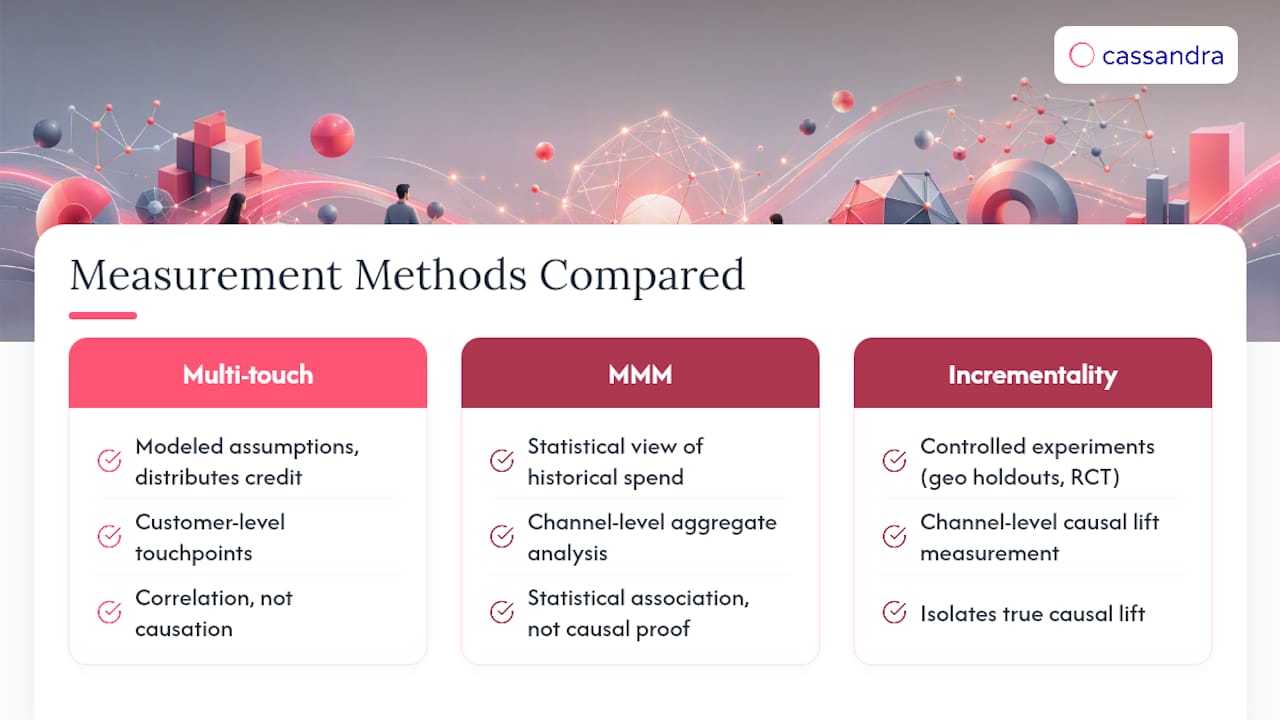
Pairing incrementality testing with measurement validation catches misallocation before it compounds into a quarter of wasted budget. A channel that looks strong in a last-touch model can still show near-zero incremental lift once tested properly, a gap that shows up repeatedly across ecommerce, fintech, and nonprofit accounts running always-on validation alongside standard attribution.
Decision-First Reporting: What the Research Actually Supports
Most reporting advice focuses on formatting: better charts, cleaner dashboards, prettier slides. That's not where the real failure happens. The failure happens when a report presents a number without ever stating what should happen because of it.
The CMO one-slider format matters not because executives are impatient, but because a ten-minute review window is a hard constraint you have to design around, not fight. Analysts who build reports assuming leadership will dig through appendix slides are optimizing for a reader who doesn't exist.
The bigger gap is upstream of formatting entirely. Teams spend enormous effort perfecting attribution models and dashboard polish while skipping the one step that determines whether any of it is trustworthy: validating that a channel's reported performance reflects real causal impact, not just correlation. A report can be beautifully structured and still recommend the wrong budget shift if the underlying attribution overstates a channel's contribution.
Prioritize in this order: build the decision-first structure first, since a badly organized true number still fails to drive action. Then validate your highest-budget channels with incrementality testing before trusting attribution alone to guide reallocation. Formatting earns trust. Validation earns accuracy. You need both, but only one of them protects the budget.
— Gabriele Franco
How Cassandra Turns Reporting Into Validated Decisions
Building the templates in this article gets you organized. It doesn't tell you whether the numbers inside them reflect real, causal impact, and that's the gap between a report that looks credible and one that actually is. Some marketing platforms combine measurement validation, incrementality testing, and marketing mix modeling so KPIs reflect what a channel truly delivered, not just what last-touch models credit.
Teams using a continuous data and validation approach can report faster month-end closes, make clearer budget reallocation decisions backed by tested lift rather than modeled assumptions, and produce executive summaries that withstand scrutiny because underlying numbers have been checked against controlled experiments. Explore how this plays out across ecommerce, fintech, and nonprofit measurement use cases, or start validating your own highest-spend channel with an incrementality test before your next monthly report goes out.
Sources
The templates and thresholds in this article draw on a handful of sources worth bookmarking directly. ScaleGrowth's marketing report template covers the CMO one-slider format and KPI prioritization in more depth. HubSpot's analytics documentation walks through channel-section examples. DashThis's report examples offer audience-specific layout guidance. Domo's reporting guide explains the dashboard-versus-deck distinction in detail, and Mailchimp's reporting resource covers cadence tradeoffs for smaller programs.
- ScaleGrowth — Marketing report template and CMO one-slider
- HubSpot Knowledge — Use marketing reports in the marketing analytics suite
- DashThis — Marketing report examples & templates
- Domo — Marketing reporting guide
- Mailchimp — Marketing reporting guidance
FAQ
What Is the 3-3-3 Rule for Marketing?
The 3-3-3 rule varies by source and isn't a single fixed standard; some marketers apply it to content formats, others to campaign timing. Given the inconsistency, treat any specific version you encounter as one team's framework rather than an industry-wide rule.
How Do You Measure Marketing Performance?
Measure it by connecting channel-level metrics (spend, conversions, ROAS) to business outcomes like revenue and pipeline, then validating attribution with incrementality testing so budget decisions rest on proven impact rather than modeled credit. A decision-first report structure, paired with a defined KPI shortlist of 15 to 20 metrics, keeps that measurement focused on what actually changes strategy.
What Is the 70/20/10 Rule in Marketing?
It's a budgeting heuristic, not a fixed law, and teams should adjust the split based on their own channel maturity and risk tolerance.
Can You Give Me an Example of Performance Marketing?
Performance marketing includes any channel paid for based on measurable outcomes rather than impressions, such as paid search bid on cost-per-click, paid social optimized for cost-per-acquisition, or affiliate marketing paid on a per-conversion basis. Reporting on these channels typically centers on ROAS and CPA rather than reach metrics, since the spend itself is tied directly to a performance outcome.
How Often Should Marketing Performance Reports Be Sent?
Weekly for active, high-spend campaigns; monthly as the default for multi-channel programs; quarterly for strategic and board-level reviews. Reporting more frequently than a stable program's volatility warrants often adds noise rather than insight, according to Mailchimp's cadence guidance.