

GA4 attribution assigns credit for key events across every touchpoint a customer encounters before converting, and Google Analytics 4's default model, data-driven attribution, is the practical starting point for most analysts. Start there. Run the Model comparison report to see how credit shifts against rule-based alternatives, and validate against incrementality testing when the stakes justify it. This article covers where to find these settings, how DDA actually works, when rule-based models still make sense, and how to reconcile GA4 against Google Ads.
TL;DR:
- Data-driven attribution relies on sufficient traffic volume and creative diversity to produce stable credit estimates, especially for mid- and upper-funnel channels.
- Rule-based models like last-click remain useful for simplicity and legacy reporting but tend to under-credit upper-funnel and awareness campaigns, skewing ROI assessments.
- Comparing model outputs over 30 and 90 days helps identify channels with unstable credit shifts, indicating the need for validation before reallocation.
- Attribution results are affected by privacy restrictions, offline data gaps, and cross-device stitching issues, limiting their accuracy for small or low-traffic properties.
- GA4 and Google Ads conversions usually differ due to default last-click attribution in Ads and technical factors like time zone differences and import delays.
Table of Contents
- Understanding GA4 Attribution: Touchpoints, Key Events, and Lookback Windows
- Data-Driven Attribution: Counterfactual Logic and When to Trust It
- Rule-Based Models Still Available: Paid & Organic and Google Paid Channels
- Where to Find GA4 Attribution Settings and Reports
- Choosing a Model and Working Around GA4's Limitations
- Reconciling GA4 Attribution With Google Ads
- The Practitioner's View: Attribution Shows Correlation, Not Causation
- When GA4 Attribution Alone Isn't Enough
- Sources
- FAQ
Understanding GA4 Attribution: Touchpoints, Key Events, and Lookback Windows
Every attribution model needs raw material to work with, and in GA4 that material is the touchpoint. A touchpoint is any marketing interaction, an ad click, an organic search visit, an email open, that GA4 can tie to a session before a key event fires. String those touchpoints together in sequence and you get a conversion path, which is what GA4's attribution models actually evaluate.
GA4 replaced Universal Analytics' rigid goals and ecommerce split with a single event based structure. Any event can be flagged as a key event, and properties get up to 30 non-default key events, or 50 on GA360, with purchases pre-flagged automatically.
The lookback window sets how far back GA4 looks for eligible touchpoints before crediting a key event. Before reviewing any attribution report, check:
- Which events are actually marked as key events, and whether that list matches your reporting goals
- The current lookback window setting under Attribution settings
- Whether your channel groupings are default or custom, since that changes how credit gets bucketed
Data-Driven Attribution: Counterfactual Logic and When to Trust It
Data-driven attribution (DDA) works differently from every rule-based model GA4 offers. Instead of applying a fixed rule, like "give 100% credit to the last click," DDA runs a counterfactual analysis. It compares conversion paths that ended in a key event against paths that did not, then estimates how much each touchpoint actually changed the probability of that outcome, using both converting and non-converting path data. That is a fundamentally different question than rule-based models ask, and it is closer to measuring contribution than simply crediting sequence.
DDA weighs several signals when building that estimate:
- Time elapsed between an interaction and the key event
- Device type used at each touchpoint
- Order in which exposures occurred across the path
- Number of total interactions in the path
- Creative or ad asset shown at each exposure
The model needs sufficient path volume and creative variance to produce stable estimates. Properties with limited traffic, or campaigns running a single static creative across few channels, give DDA less signal to work with, and credit allocations can shift noticeably over short periods as a result. That instability is the tell that something is under-supported, not that DDA itself is broken.
Pro Tip: Run the Model comparison report over a rolling 30 and 90-day window side by side. If a channel's credit swings by double digits between the two, treat that channel's DDA numbers as provisional and confirm with a lift test before reallocating budget.
Rule-Based Models Still Available: Paid & Organic and Google Paid Channels
GA4 deprecated first click, linear, time decay, and position based models in November 2023, leaving two rule-based options alongside DDA.
Paid & organic last click gives full key event credit to the last paid or organic channel a user touched before converting, direct traffic included as a fallback. Google paid channels last click narrows that further, crediting only the last Google Ads, Google organic search, or other Google paid touchpoint, and it excludes direct traffic entirely, falling back to the next eligible Google channel in the path.
-
Rule-based models suit legacy reporting continuity, straightforward Ads-only campaign analysis, or situations where a simple, auditable rule matters more than nuance.
-
They systematically under-credit upper-funnel channels, display, video, and awareness campaigns rarely get touchpoint recognition under last-click logic.
-
Relying on them exclusively can distort ROI comparisons across channel types, making bottom-funnel spend look more efficient than it is.
Where to Find GA4 Attribution Settings and Reports
Every model comparison starts in the same three places inside the GA4 interface.
- Go to Advertising > Attribution > Model comparison to see key events and revenue broken out by channel, model by model, with percent-change columns showing exactly how credit moves.
- Check Advertising > Attribution > Attribution paths (sometimes labeled Key event paths) to inspect the raw sequences GA4 is scoring, useful for spotting sparse or unusual paths before trusting the aggregate numbers.
- Change the active model or lookback window under Admin > Attribution settings, which controls what the standard reports display going forward.
Switching the reporting attribution model is retroactive for event-scoped traffic dimensions, meaning historical reports recalculate under the new model. Session-scoped and user-scoped dimensions, however, stay fixed. That distinction matters when a stakeholder asks why last month's numbers "changed" after a model switch, they didn't move for every metric, only for the ones tied to individual events.
Choosing a Model and Working Around GA4's Limitations
Default to DDA when your property has enough volume and creative variety to support stable estimates, and when you need a realistic read on mid-funnel and upper-funnel contribution. Fall back to Paid & organic last click when you need simplicity, historical comparability, or a number that matches what a less technical stakeholder expects from "attribution."
- Run the Model comparison report monthly and document which channels are model-sensitive versus stable.
- Set custom channel groups so credit lands in categories that match how your team actually plans budget.
- Treat any single attribution model as one input, not a verdict, and pair it with a lift test before major reallocations.
GA4 attribution also carries structural limits worth naming directly. Privacy regulations and consent choices cause real signal loss, some touchpoints simply never reach GA4. Offline conversions and CRM-sourced revenue often sit outside the platform entirely unless manually imported. Cross-device journeys get stitched imperfectly without a logged-in identifier. And small properties face the data sufficiency problem covered above.
Pro Tip: Treat GA4 attribution as your operational reporting layer, the system that tells you where credit is flowing week to week, and pair it with incrementality testing or marketing mix modeling for the causal question of what actually drove growth. Our guide to integrating MMM, incrementality, and attribution walks through building that stack.
Reconciling GA4 Attribution With Google Ads
Analysts routinely see different conversion numbers in GA4 versus Google Ads for the same campaign, and the mismatch usually traces to one structural cause: Google Ads applies last-click attribution to GA4-imported conversions by default, regardless of which model GA4's own reports use.
Beyond that default, a few technical factors compound the gap:
- Differing attribution models between the two platforms for the same underlying event
- Time zone settings that shift which day a conversion gets counted
- Different counting methods (one conversion per session versus per interaction)
- Import timing lag between when a conversion fires and when Ads ingests it
Pick a single source of truth per metric before comparing the two platforms line by line. Use Ads' own attribution columns when the goal is bidding optimization, since that's the signal the algorithm actually acts on, and use GA4 when the goal is cross-channel context Ads alone can't provide.
The Practitioner's View: Attribution Shows Correlation, Not Causation
GA4 attribution, even at its most sophisticated with data-driven modeling, answers "where did credit flow." It does not answer "what would have happened without this spend," and treating those two questions as the same one is the most expensive mistake in measurement. Attribution and MMM serve different jobs: attribution allocates observed credit, while incrementality testing and marketing mix modeling estimate causal lift.
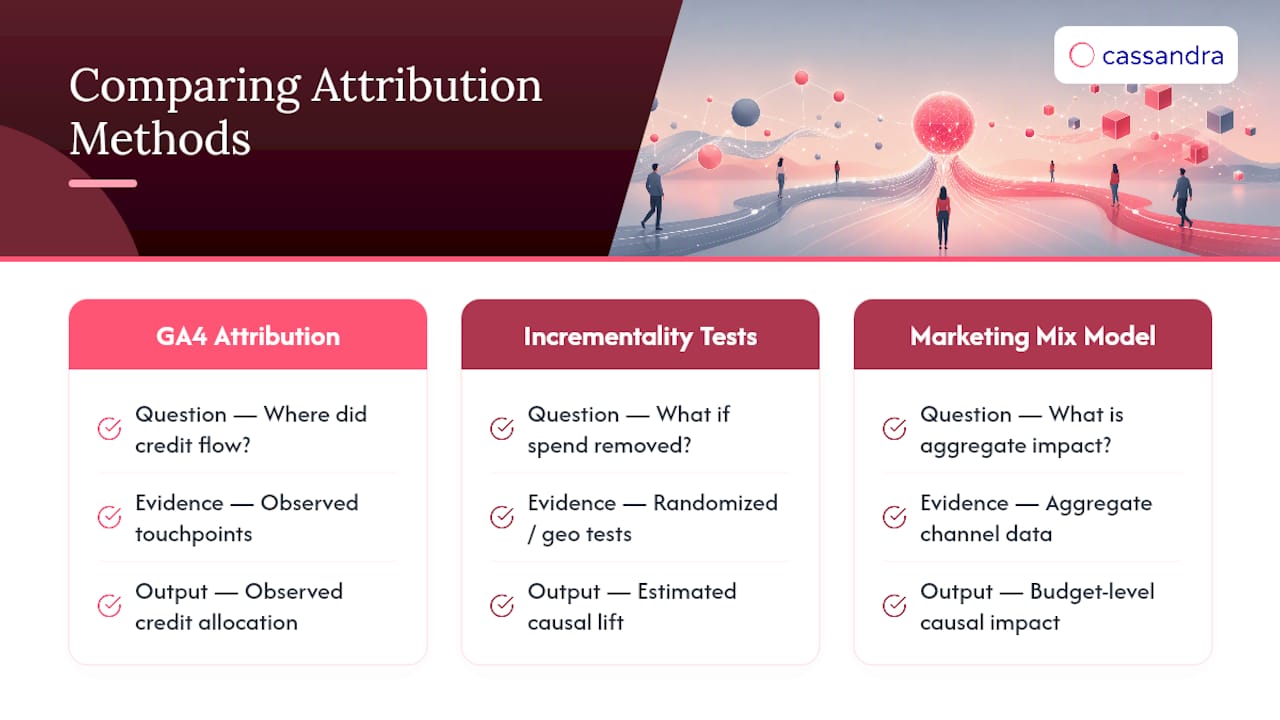
Randomized incrementality tests and geo-lift experiments hold a variable constant in one market while changing it in another, isolating true impact from correlation. Marketing mix modeling extends that causal lens across the full budget, including channels GA4 never sees, like TV, out of home, or offline retail. For a deeper walk-through of how these methods complement attribution mechanics, our primer on data-driven attribution breaks down the practical overlap.
Commission a dedicated measurement partner when attribution gaps are costing real budget decisions or when cross-stack reconciliation has outgrown a single analyst's bandwidth. Run tests in-house when the question is narrow and the team already has the experimentation infrastructure.
— Gabriele Franco
When GA4 Attribution Alone Isn't Enough
When Model comparison shows a channel's credit swinging wildly between DDA and last-click, or when GA4 numbers won't reconcile with Google Ads no matter how carefully you check settings, that's usually a sign attribution has hit its ceiling. There are platforms that pair cross-channel analytics with incrementality testing and marketing mix modeling, so you get a causal answer instead of another model's best guess.

Where GA4 tells you which channel touched the path, some marketing measurement platforms tell you whether that channel actually moved the outcome, validated against real experiments rather than probability estimates alone. Some brands have documented measurable ROI gains across fashion, nonprofit, and travel sectors by redirecting spend away from channels that looked strong in attribution reports but tested weak in incrementality. Explore Cassandra's measurement use cases to see how a validated approach applies to your own channel mix, and get a clear next step toward closing the gap between what your attribution model says and what your budget actually needs to do.
FAQ
What does GA4 stand for?
GA4 stands for Google Analytics 4, the current version of Google's web and app analytics platform, which replaced Universal Analytics with an event-based data model.
What does a 7-day click, 1-day view lookback window mean?
It means GA4 credits a touchpoint only if it falls within the configured lookback window before the key event, after which the interaction becomes ineligible for credit.
What are the four types of attribution models?
Historically, marketers reference first-click, last-click, linear, and data-driven as broad categories, but GA4 itself now offers only three: data-driven attribution, Paid & organic last click, and Google paid channels last click, since first click, linear, time decay, and position-based models were deprecated in 2023.
What are the main limitations of GA4 attribution?
GA4 attribution faces privacy-driven signal loss from consent restrictions, gaps in offline and CRM conversion data, imperfect cross-device stitching, and unstable estimates on low-volume properties, which is why pairing it with incrementality testing or marketing mix modeling gives a more complete picture.
Why do GA4 and Google Ads show different conversion numbers?
Google Ads applies last-click attribution to GA4-imported conversions by default, regardless of the model set in GA4's own reports, and differences in time zone, counting method, and import timing compound the mismatch.